Why Teams Are Moving from 8th Wall to Mattercraft
With 8th Wall winding down and no longer accepting new projects from February 2026, many teams are actively looking for a future-proof alternative that stays aligned with real web technologies and avoids platform lock-in. Mattercraft is actively developed by Zappar, a WebAR pioneer delivering production AR since 2011, and is designed for long-term development beyond any single platform lifecycle
Mattercraft focuses on WebAR first and gives you everything needed to build face tracking, world tracking, image tracking and VPS experiences directly in the browser with instant device preview. Our tools are built for production use and shaped by more than a decade of WebAR deployment across brands, agencies and enterprise teams.
The sections below outline how Mattercraft compares to 8th Wall Studio and why developers choose it for long term WebAR development.
Mattercraft vs. 8th Wall Studio
Both 8th Wall and Mattercraft let creators build browser-based immersive experiences, but while 8th Wall is winding down it’s platform and tools, Mattercraft continues to expand is feature set with a full visual 3D development environment, integrated VPS options and flexible self-hosting.
| Feature | Mattercraft | 8th Wall Studio |
|---|---|---|
| Primary focus / use case | End-to-end 3D development engine for any immersive web content — from marketing activations and e-commerce visualisers to enterprise training and headset-grade XR sites. | Web-gaming engine built for marketing use cases and simple mini games. |
| Visual editor | 3D browser based visual editor | 3D browser based visual editor |
| AR tracking types | World, face, image, multi-image and curved surface tracking via WebAR, WebXR or App Clip | World, image, face tracking via WebAR |
| Location-based VPS | Built in Immersal or MultiSet VPS support; for accurate location-based AR. User owned maps and self hosting available | Lightship VPS. Maps owned and require being uploaded to Niantic. |
| No-code workflows | Animation system, built in no-code behaviours for interactions, visual HTML and UIKit for UI plus reusable zcomponents | Drag-and-drop face/world effects and behaviours |
| Built-in animation tools | Visual timeline animation system with recognisable keyframes and state setup | No timeline system and custom state machine setup |
| Physics engine | Integrated web-based Havok™ physics (rigid bodies, joints, constraints, real-time tuning) | Custom in-house physics engine |
| Cross-platform support | Web based - Mobile, Headsets, Glasses and Desktop | Cross platform deployment - native app building in Beta |
| Full Project Export | Mattercraft projects are simply static web pages. You can export the whole project and see the standard folder / file setup, use your own IDE or version control. | 8th Wall announced the ability to export your projects on 16th December 2025, allowing you to download code, assets, and image targets. |
| Pricing model | Affordable Developer plans ~$12/mo Flexible commercial pricing with custom hosting & branding, unlimited views and projects |
Commercial licences no longer available. |
| White-label / branding | No Mattercraft branding on commercial plans. Splash screen is index.html file | 8th Wall branding |
| AI / generative assistance | Built-in AI assistant with access to the latest LLM version for Ask, Edit and Code completion modes. | Asset Lab for 3D model generation through text prompts |
| Hosting & deployment | Live preview and instant publish to Zappar CDN URLs or self-host on custom domain like any web app. | Publish to global CDN with staging/production states and live preview. |
Migrating from 8th Wall Studio to Mattercraft
Moving an existing 8th Wall Studio project to Mattercraft is straightforward and does not require abandoning standard web development patterns such as HTML, CSS, TypeScript, npm, or conventional project structures.
A typical migration looks like this:
- 1. Export assets and logic from your 8th Wall project
- 2. Recreate scenes in Mattercraft’s visual editor
- 3. Replace tracking types with Mattercraft equivalents
- 4. Rebuild interactions using TypeScript, animations, or no-code behaviours
- 5. Preview instantly on device using Live Preview
- 6. Publish via WebXR, App Clip, or export for self-hosting
A full step-by-step tutorial is available below.
Full Project Export. No Lock-In.
Mattercraft projects are standard web applications. At any time, you can export your entire project as a ZIP file including TypeScript, HTML, CSS, assets, scenes, and npm dependencies. You can continue development locally, integrate with your own IDE and version control, and deploy anywhere you choose. Your work does not disappear when a platform changes direction.
Learn more about exporting your Mattercraft projects: https://docs.zap.works/mattercraft/getting-started/creating-a-project/#exporting-a-project-zip
Visual Scene Editor
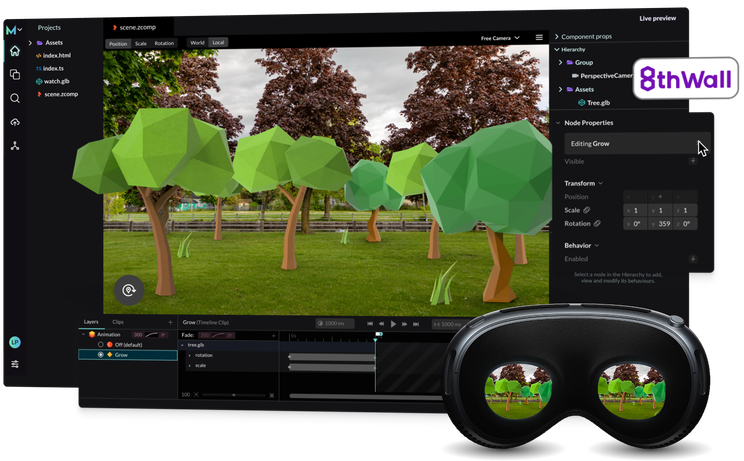
Much like 8th Wall Studio, Mattercraft provides a complete 3D visual editor for quick and easy development for all technical abilities.
Features include:
- Drag and drop importing and placing of assets
- Improved transform controls
- Custom lighting
- Hierarchy scene setup
- Instant editor updates
It feels like working in a native 3D editor while staying entirely in the browser.
Learn more about the Mattercraft UI: https://docs.zap.works/mattercraft/getting-started/getting-started-videos/part-1/
WebAR and World Tracking
8th Wall’s strength is its SLAM and world tracking support. Mattercraft leverages the worlds best computer vision for WebAR world tracking through App Clip and WebXR technology on iOS and Android respectively (ARkit and ARCore) without an app download.
The full feature set is supported through App Clip and WebXR and requires no additional setup.
Try a world tracking demo below:

WebAR and VPS (Visual Positioning System)
Mattercraft supports VPS using the same high-quality tracking foundation that powers its world tracking. You can make use of leading third-party VPS providers such as Immersal or MultiSet to anchor content to precise real-world locations. Unlike 8th Wall Studio, you have full control over your VPS maps so you can host them yourself, manage access, versioning and choose the provider that best fits your project.
This flexible, open approach ensures you can build location-based WebAR experiences on your terms.
Learn more about VPS in Mattercraft: https://zap.works/mattercraft/location-based/
Zappar Computer Vision Integration
Mattercraft includes native support for Zappar’s computer vision stack, providing consistent, browser-based tracking across a wide range of devices. This covers the core AR modes used in commercial WebAR projects and requires no additional runtimes or platform-specific APIs.
Supported tracking types include:
- World tracking
- Face tracking
- Image tracking
- Instant anchors
- Curved surface tracking
For teams that need ARKit or ARCore-grade world tracking on iOS, Mattercraft also supports optional App Clips deployment. This gives developers a clear choice between browser-only workflows using Zappar CV and native world tracking when the use case requires it.
Learn more about Mattercraft’s Computer Vision support: https://docs.zap.works/mattercraft/augmented-reality/zappar-camera/
VR and MR for Headsets
8th Wall focuses primarily on mobile WebAR. Mattercraft supports development for all leading headsets on the market through WebXR.
Device support includes:
- Apple Vision Pro
- Meta Quest headsets
- PICO
- Magic Leap 2
- Zapbox
You can set up XR camera rigs, controllers and locomotion visually and preview them directly in the editor. Learn more about Mattercraft’s WebXR support: https://docs.zap.works/mattercraft/webxr/
Built-In Animation System
8th Wall Studio typically relies on imported animations or custom JavaScript. Mattercraft comes with a comprehensive visual animation system, featuring keyframe timeline animations and state-based property values. If you're familiar with timelines and keyframe capabilities, you'll find similar functionalities here.
Mattercraft includes:
- A complete keyframe animation timeline
- State based animation
- Property animation
- Real-time playback in the viewport
Learn more about Mattercraft’s animation system: https://docs.zap.works/mattercraft/animation-system/
Live Preview for Rapid Development
8th Wall Studio has a preview that syncs to the editor (changes made at runtime, are shown at edit time). Mattercraft takes a different approach with a completely live preview (any changes made in the editor will update at runtime). We believe this is a more user friendly approach and makes changes quicker and easier. Features include:
- Instant hot reload
- Real-time device preview links
- Simultaneous multi-device previews
- Device simulation modes
- Network throttling and performance monitoring
- No refresh required
Every change appears instantly on any connected device.
Learn more about Live Preview in Mattercraft: https://docs.zap.works/mattercraft/previewing-and-publishing/live-preview/
Real-time Physics with Havok
Unlike 8th Wall, which uses its own lightweight internal physics system, Mattercraft uses Havok Physics, a professional grade physics engine developed and maintained by Microsoft.
With Havok, you can configure:
- Rigid bodies
- Colliders
- Joints
- Constraints
- Friction and restitution
- Gravity and real-time simulation
Everything can be tuned visually and previewed instantly.
Learn more about the Havok physics engine in Mattercraft: https://docs.zap.works/mattercraft/physics/
Integrated 2D and 3D UI Workflows
Unlike 8th Wall Studio’s separate UI builder, Mattercraft lets you create screen and in-scene interfaces directly within your project using standard HTML, CSS and TypeScript. UI can be anchored to the screen, attached to the camera or positioned in 3D space, with safe-area controls for devices with notches or full-screen deployments.
With Mattercraft, you can create:
- 2D screen UI using native HTML and CSS
- Camera-anchored UI that tracks the active view
- 3D-anchored HTML elements for labels and hotspots
- Layouts that adapt automatically to device dimensions
- Interfaces that can be styled, previewed and adjusted in real time
Everything updates instantly in the editor or through Live Preview, so your UI behaves predictably across mobile, desktop and headset environments before you publish.
zcomponents vs 8th Wall’s SceneGraph
8th Wall Studio uses a SceneGraph with components authored in JavaScript. Mattercraft introduces zcomponents, a higher level prefab-like system that lets you group meshes, behaviours, animations, UI and logic into reusable building blocks. You can duplicate zcomponents, expose parameters, attach scripts and share them across scenes and projects.
It is a faster, reusable and more scalable way to build complex immersive applications.
Learn more about zcomponents in Mattercraft: https://docs.zap.works/mattercraft/zcomponents/
npm and the Web Ecosystem
8th Wall supports external JavaScript modules, but setup can require manual integration and is custom to the 8th Wall setup.
Mattercraft has a built in npm and dependencies browser so you can search the vast library of already existing web packages, install them instantly and use them in with little configuration.
Whether you need shaders, math utilities, UI systems, animation helpers or custom WebGL tools, npm is one click away.
Learn more about Mattercraft’s Dependencies Browser: https://docs.zap.works/mattercraft/dependencies-browser/
Custom Contexts and Shared State
8th Wall projects often manage application state with global variables or custom patterns. Mattercraft includes Custom Contexts, a typed system for managing shared data across scenes, behaviours and UI.
This is ideal for scoring systems, configuration data, shared materials or multi-scene applications.
Learn more about Custom Contexts in Mattercraft: https://docs.zap.works/mattercraft/scripting/custom-contexts/
Familiarity for Web Developers
If you already work comfortably in 8th Wall Studio’s web oriented environment, Mattercraft will feel natural.
It uses:
- HTML and CSS for UI
- TypeScript for logic
- NPM for libraries
- A browser based workflow
- Instant publishing with hosted URLs
Mattercraft combines everything you already know with powerful 3D tools and advanced AR and XR features that help you move faster.
Documentation and Templates
8th Wall’s documentation is now static as the platform winds down, while Mattercraft’s docs are actively maintained and updated alongside new features. The structure focuses on clear workflows, practical examples, and step-by-step guidance rather than isolated reference pages.
Mattercraft also includes a set of production-ready templates covering world tracking, face tracking, VPS, headset projects, 3D sites, and physics setups. Each template includes preconfigured scenes, scripts and UI patterns, giving creators a working baseline to extend rather than starting from scratch.